Ever wanted to create your own website but thought it would be too expensive or complicated? Don’t worry, you are not alone in this.
In 2026, creating and hosting a WordPress website for free is actually very easy, even if you have no technical knowledge. In this blog, we’re going to show you exactly how to create a free WordPress website using GoogieHost, one of the best platforms for beginners who want to get online without investing upfront.
The best part, you don’t need to know coding or anything complicated. With just a few simple steps, you can create and host a website for free and make it live on the internet. It is much easier than most people even think. You just need the right guidance, and you are good to go.
This guide is specially made for students, beginners, bloggers, freelancers, and small business owners who want to build a website but are limited by budget or technical knowledge. From setting up free hosting on GoogieHost to installing WordPress, customising your site, and publishing your first content, we will cover each step in a practical, beginner-friendly way.
Let’s get started and turn your ideas into a real website. Your website idea is already powerful; the only thing missing is taking the first step.
What You Need Before Starting
Before you start building your website, you just need a few basic things in place.
Before starting, have a simple idea of what you want to create. It could be a blog, a portfolio, or a business website. This will help you choose the right design and structure without confusion later. You don’t need anything planned perfectly; just a rough idea and the right basics are enough to get started confidently.
What Is WordPress?
WordPress is a popular website-building platform that allows you to create websites, blogs, and online stores without needing to know coding skills. It works as acontent management system (CMS), which simply means it helps you to create, edit, and manage your website content, like text, images, and pages, in an easy way. Instead of writing complex code, you can build your website using ready-made templates and drag-and-drop editors along with simple settings.
In simple terms, WordPress acts like the “backbone” of your website. It gives you ready-made designs called themes, which control how your website looks, and plugins, which add extra features like contact forms, SEO tools, or security. You wish to create a blog, a personal portfolio, a business website, or even an online store; WordPress makes the process smooth and flexible.

The best thing about WordPress is that it is suitable for both beginners and advanced users. You can start with a basic free website and later customize or scale it as your needs grow. That is the reason why millions of websites on the internet are powered by WordPress as it is simple to start, powerful to use, and grows with you over time.
How to Start a WordPress Website for Free in 2026 (Step-by-Step Beginner Guide)
Now, let’s start with the essential steps you need to follow if you wish to start your own website for free in 2026.
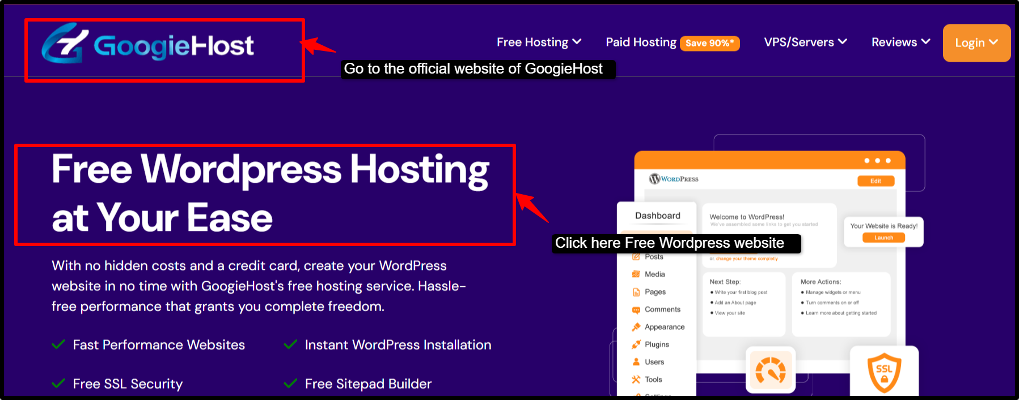
Step 1 – Choose a Free WordPress Hosting Provider
This is going to be your first step, choosing a free WordPress hosting provider like GoogieHost, which will help you get your website online without any cost. This is the most important step of choosing a reliable and free hosting company or provider, because this is where your website’s files, data and content will be live online.
GoogieHost will provide you with 100% free hosting, which removes the biggest barrier of money, especially for students and beginners. It allows you to experience fast performance with SSD & LiteSpeed, giving you 1000 MB SSD storage, a free subdomain, free SSL Security and one-click WordPress installation. You can have generous bandwidth and full control of the panel access.
Step 2 – Get a Free Domain Name
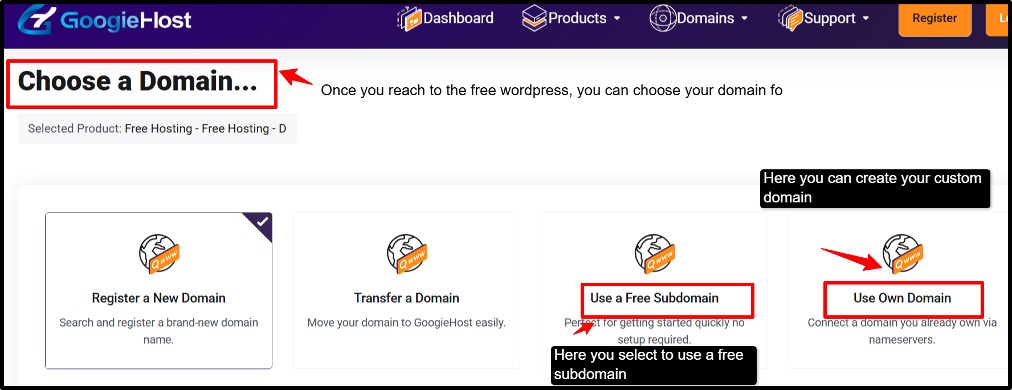
Once you have chosen your hosting, the next step is getting a domain name; this is your website’s address on the internet (like yourname.com). If you are starting for free, you will usually get a free subdomain such as yourname.googiehost.com. This is perfect for beginners who are just testing ideas or learning.
| Free Subdomain | Custom Domain |
| Example: myblog.googiehost.com | Example: myblog.com |
| It comes included with free hosting, no cost, and is quick to set up. | Looks more professional and trustworthy. |
| Best for practice or small projects | Requires buying from domain providers. |
If you select a free domain, then you get to choose your own website name, check the availability, select a subdomain (if free), and then link it to your hosting account.
If you have the option to connect to a domain, then use GoogieHost’s free subdomain. Connect your own custom domain if you already have one, and then upgrade later and buy a domain for branding.
When to upgrade to a paid domain: When you wish to, when you want a professional-looking website, or when you are starting a business or personal brand. A paid domain upgrade will offer you better trust and long-term growth. With GoogieHost, you can start completely free using a subdomain and upgrade later only when your website grows.
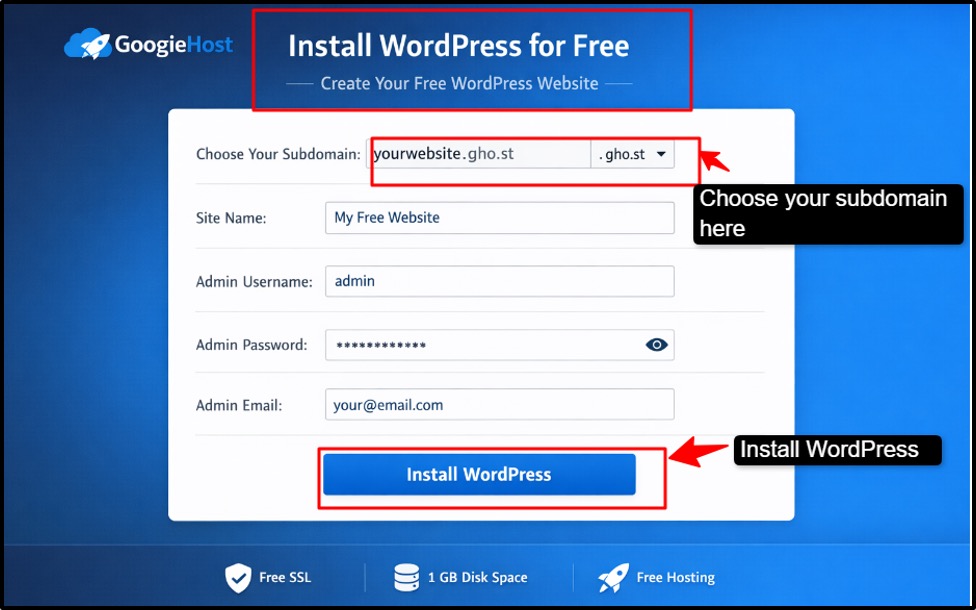
Step 3 – Install WordPress for Free
Now that your hosting and domain are ready, it is time to install WordPress on GoogieHost and bring your website to life and power. WordPress is the world’s most popular content management system (CMS) that allows you to create, manage, and publish content on your website without needing any coding skills.
Simply, WordPress is the tool that will help you to build your website design, write and publish blog posts, add images, videos and pages and manage everything from one dashboard. WordPress will transform your empty hosting into a fully functional website. Once you install WordPress, you can easily create your posts, customize your website, install themes and plugins and manage everything hassle-free.
One-click WordPress Installation
This is considered to be the easiest method, especially for beginners.
In just a few minutes, your WordPress website will be ready to use.
Manual Installation (Optional-Advanced Users).
If you want more control, you can install WordPress manually:
This method is more technical and usually not needed. for beginners.
How to access the WordPress dashboard:
Once installed, you can manage your website through the dashboard.
It will take you to the dashboard where you will create posts and pages, change the design, and add features like plugins. We would recommend using the one-click method if you are a beginner, as it is easy, fast, and avoids errors.
Step 4 – Choose a Free WordPress Theme
Now that your WordPress is installed on GoogieHost, the next step is to choose a theme, which will control how your website looks and feels. A WordPress theme controls the design, layout, colours, fonts, and overall appearance of your website. A theme will decide how your website is gonna look, how the content will be displayed, along with the style and layout of your pages.
Your theme is the first impression visitors get, so a good theme will help you to make your website look according to your needs, keep all the visitors engaged and improve the user experience. If you are creating a photography portfolio or service website, choose a theme that focuses on the large images and galleries with a clean and minimal design, or if you are starting a food blog, then your theme should highlight images of food and have sections for recipes and categories.
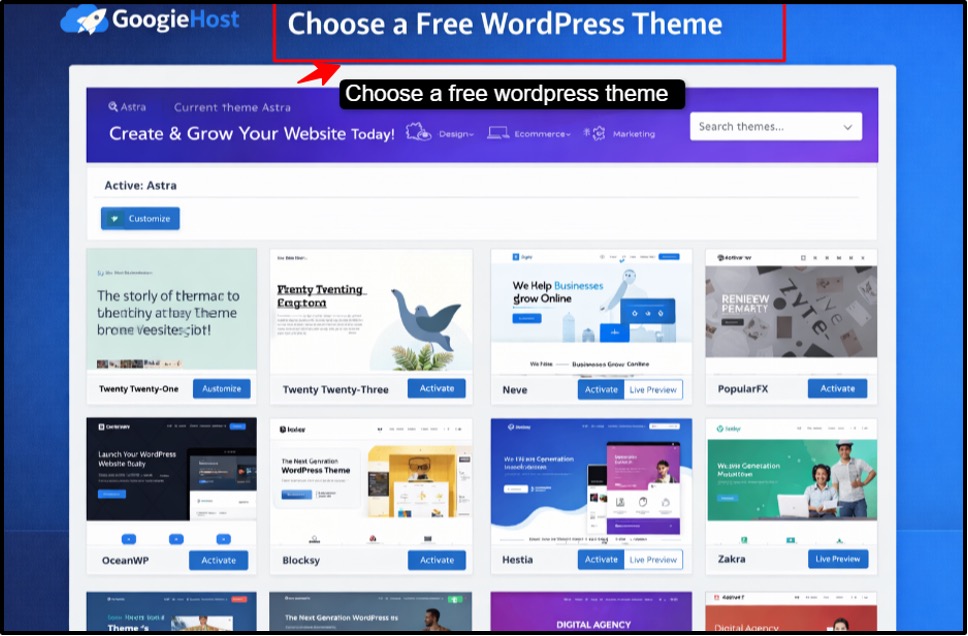
How to choose a free theme:
Your website design will change instantly.
Step 5 – Install Essential Free Plugins
Now that your website design is ready, the next step is to install plugins in WordPress. Plugins add extra features and improve your website’s performance, security, and functionality.
How to install plugins:
You can install all plugins directly from your GoogieHost-hosted WordPress dashboard.
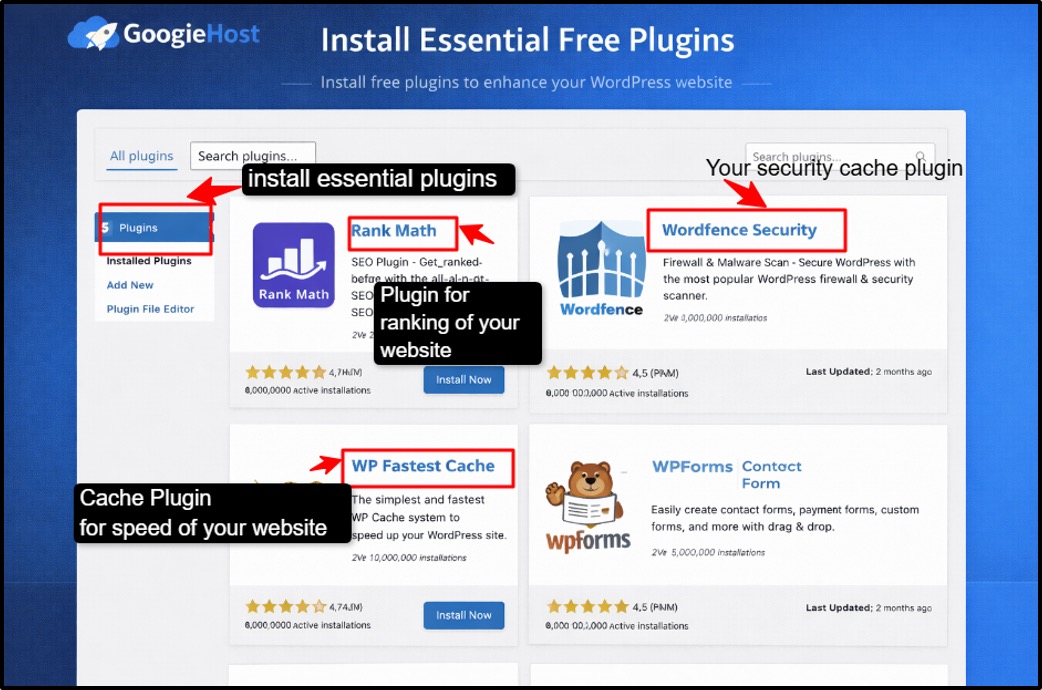
Essential Free Plugins
1.SEO Plugin (Search Engine Optimization)
2. Security Plugin
3. Cache Plugin
4. Content Form Plugin
Plugins make your website more powerful without coding. On GoogieHost, using lightweight and essential plugins ensures your site runs smoothly even on free hosting.
Step 6 – Create Important Pages
When your website is ready to be set up on WordPress through GoogieHost, it is now time to create the main pages that every website needs.
How to Create Pages:
Repeat this for each page.
Now there are some essential pages that you need to create, like:
This is the main page of your website where visitors land first. So you always need to keep it clean and simple and clearly explain what your website is about.
This is where you tell people who you are, what you do, and why your website exists. This will help to build trust with your audience.
Add a contact form (using plugins) so visitors can easily reach you. You can also include email or social links.
This is the page that will explain how you collect and use user data. It is very important for building trust and is required for tools like different types of ads or analytics.
This is where all your posts will appear. You can start publishing articles and keep your content organised here.
Step 7 – Write and Publish Your First Blog Post
Now comes the last step, the most exciting step for you, where you create your first blog post on WordPress hosted on GoogieHost.
How to Add a New Post:
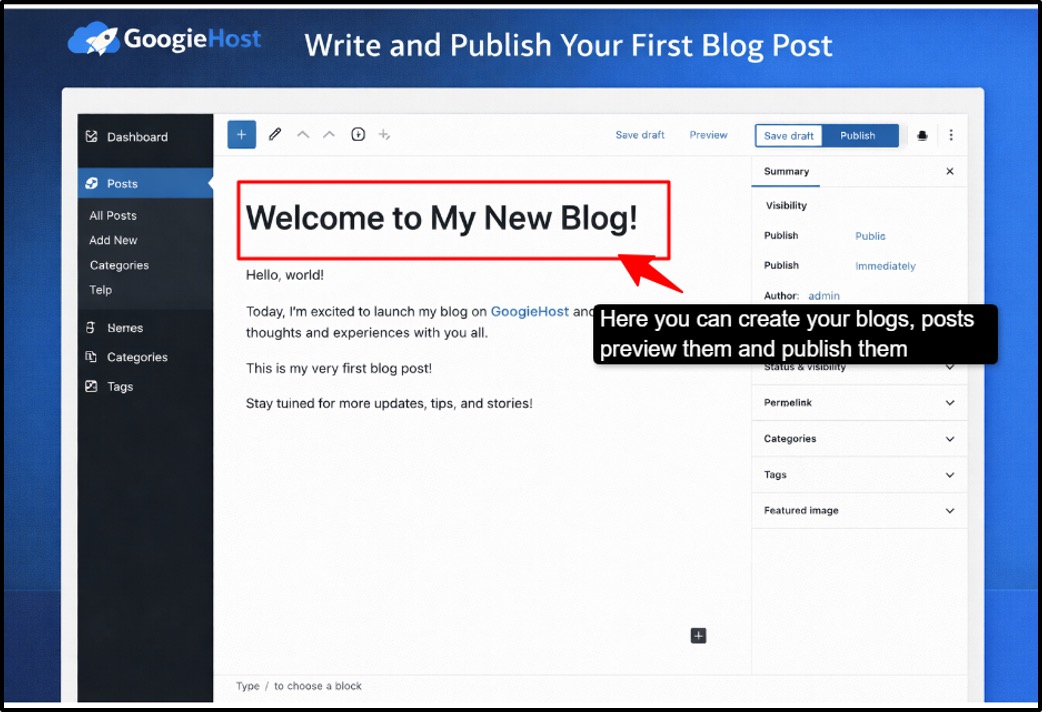
This is the spot where you create all your blog articles. Now we will introduce you to some of the formatting tips that will help you to make your post look good.
Formatting Tips:
Good formatting keeps readers engaged.
Basic SEO Tips for Beginners:
Once your HTML website for free is live, the next important step is making sure people can find it on Google. This is where SEO ( Search Engine Optimization) comes in.
Using WordPress on GoogieHost gives you a solid base, but you still need to apply some basic SEO practices to grow your traffic.
SEO simply means optimising your website so it can rank higher on Google, get more visitors and reach your target audience. Install a free SEO plugin like Yoast SEO and Rank Math, which will guide you while you are writing your content, help in optimising the keywords, improving the readability, and then generating the XML sitemap automatically.
Content is the most important part of SEO. You should always write clear, helpful and original content. Focus on solving user problems and using simple language. SEO is not complicated; it just needs consistency and the right basics. These SEO tips for beginners will help your blog to rank better on Google.
Preview & Publish:
After writing your content in WordPress, the final step comes where you have to preview and publish your post so it becomes live on your website. This step is very important because it ensures your content looks perfect before your visitors see it.
The Preview option lets you see how your post or page will look on your website before publishing it. Think of it like a “final check” where you can see the design and layout, check images and formatting and test how it looks on mobile and desktop. Before publishing, a preview is important as it helps you to fix mistakes (spellings, grammar, formatting), adjust images and spacing and ensure everything looks professional.
Publishing is the next step after preview; it makes your post live on the internet, so anyone can visit and read it. Once it is published, your content becomes visible to users, it can appear on Google after indexing, and you can even share it on social media. After previewing, click the Publish button. WordPress may ask for confirmation, and then you can click to Publish.
WordPress even allows you to schedule posts like it will publish automatically at any specific time and even help you stay consistent with the content.
Create a new post, format it with headings and images, optimize it using SEO tools, then preview and publish it with confidence.
Customise Your Website Settings
After following all the steps we have mentioned above, your website is now live, so now the time has come to tweak a few basic settings to make it look more professional and work properly. Do not worry, this part is very simple to understand, and it will only take a few minutes on WordPress.
Permalinks are your page URLs. By default, they look messy, so you should make them readable and clean.
Following these two steps will make your URLs look like yourwebsite.com/sample-post instead of random numbers, which is better for both users and SEO.
Your site title is your website name, and the tagline is a short description. Always try to keep it simple and clear because it is the first thing people will notice about your website.
You can easily choose what visitors see first when they land on your site. This setting of the homepage display will help you control how your website is presented.
SSL is one important part of your website, as using this will make your website secure (HTTPS instead of HTTP). Most of the free hosting, including GoogieHost offers free SSL.
This SSL will protect your visitors’ data and help build trust in them.
Free WordPress Website Limitations (Be Honest Section)
Now, here we will give you some honest opinions about the WordPress Website limitations. When you go with a free WordPress setup, the first thing you will notice is limited storage. You don’t get much space to upload images, videos, or heavy content. If you are using GoogieHost, for instance, it could be a pretty decent platform to start, but it still comes with some of the real limitations you should know.
Simply, GoogieHost is a great platform for learning, college projects, or for writing and publishing small blogs, but if you are planning something professional or big, then using this platform will definitely outgrow you.
When Should You Upgrade to Paid Hosting?
There are certain factors that you should consider if you want to upgrade to paid hosting. You will know when it is time for an upgrade when your site starts getting more traffic than usual.
Payment integrations, advanced plugins, and tracking tools also don’t always perform well on the free plans. On top of that, visitors are very less likely to trust a site that looks basic and runs on a subdomain. If your goal is to turn your website into a real income source, you need the kind of performance, control and reliability that free hosting simply cannot offer.
So it is very simple for you to understand, upgrade when your site stops feeling like a test project and starts feeling like something you actually care about growing.
Free WordPress Website vs Paid WordPress Website (Quick comparison table)
Most of the beginners wish to start with the free plan to test ideas or to learn. But as your site will grow, and your goals will change, like more visitors, branding and earning money, then a paid hosting plan gives you more freedom and power. Free websites are best for static or small projects, while paid websites are better for scalable and growing businesses.
If you are just starting your journey, a free WordPress website is a great way to learn, experiment, and build basic sites without any risk. But as your website will grow, in terms of traffic, content or business goals, you will need to switch to a paid plan to unlock better performance, scalability and full control.
This table will help you to understand the difference and highlight the main difference you will feel in real use:
| Feature | Free Website | Paid Website |
| Storage Space | Small, limited Space (1000MB SSD Storage) | Much larger storage ( 10GB NVMe SSD Storage) |
| Website Speed | Basic shared resources can make a website slow | Faster performance & better server priority. |
| Custom Domain | Uses a subdomain (e.g., googiesite.com) | Let’s you use your own domain (yoursite.com) |
| Support Quality | Limited help, slower responses. | Priority support with faster responses. |
| Monetization & Tools | Limited access to advanced plugins & tools | Full access to monetization tools, plugins, and integrations. |
FAQs
Yes, you can absolutely start a WordPress website for free using GoogieHost. It will provide you free hosting along with a subdomain, so you don’t need to spend anything to get started. You can install WordPress, create pages, and publish content just like a normal website. It is a great option if you are a beginner or just testing your ideas before investing money.
Yes, GoogieHost is fairly safe for beginners and small projects. It offers basic security features like free SSL and account protection. However, since it is free hosting, it may not be as strong or reliable as paid services. It is good for learning and practice, but for business or important websites, upgrading later is a better choice.
Yes, you can earn money even with a GoogieHost website through blogging, affiliate links, or promoting services. But if you use a free subdomain and limited resources, it might not look very professional. For high income or branding, switching to paid domain hosting will help a lot.
You can use GoogieHost for free as long as you follow their terms and keep your website active. There is no strict time limit, but inactive sites may get removed. So as long as you keep updating or using your website, you can continue using it for free.
With GoogieHost, you will be using WordPress.org, which gives you more control and flexibility as compared to WordPress.com, as it is easier but limited, while WordPress.org will allow you to customize everything. So if you want freedom and growth, GoogieHost + WordPress.org is a better combination.
No, you don’t need coding skills to use WordPress on GoogieHost. You can create your website using themes, plugins, and simple settings. Everything is beginner-friendly. Coding is only needed if you want advanced customization later.
Yes, you can easily move your website from GoogieHost to a paid hosting provider later. You can migrate your files, databases, and even connect a custom domain. Many people start free and upgrade once their website grows.
GoogieHost is okay for basic SEO, especially if you use plugins like SEO tools and follow good content practices. But since it uses a free subdomain and limited resources, it may not perform as well as paid hosting in the long run. For better rankings and trust, upgrading to a custom domain is recommended.
Final Conclusion
Starting a website might have seemed confusing or expensive at first, but now you have seen how simple it actually is. In this blog, we have walked you through everything, from selecting a free hosting provider like GoogieHost to installing WordPress, selecting a theme, optimising your site for SEO, and finally previewing and publishing your content.
If your problem was not knowing where to start, worrying about costs, or feeling overwhelmed by technical steps, this guide has solved that by giving you a clear, step-by-step path to follow. You have learned how to create a fully functional website without spending money, while still using powerful tools that make content management simple and efficient.
This means you are no longer stuck just thinking about creating a website; you are now ready to actually build one. You want to start a blog, create a portfolio or test a business idea, you have everything you need to begin confidently.
The next step is simple: take action. Start building, keep learning, and improve as you grow. Your website journey doesn’t just start here; it will grow with you over time.